Ever stared at a blank screen, knowing you need to build an AI chatbot, but the thought of navigating enterprise cloud infrastructure makes you want to close your laptop?
You aren’t alone. For many tech professionals, data scientists, and ML engineering students, bridging the gap between a simple local Python script and a fully deployed, production-ready AI application feels like hitting a brick wall. The jargon is thick, and the configuration workflows can be overwhelming.
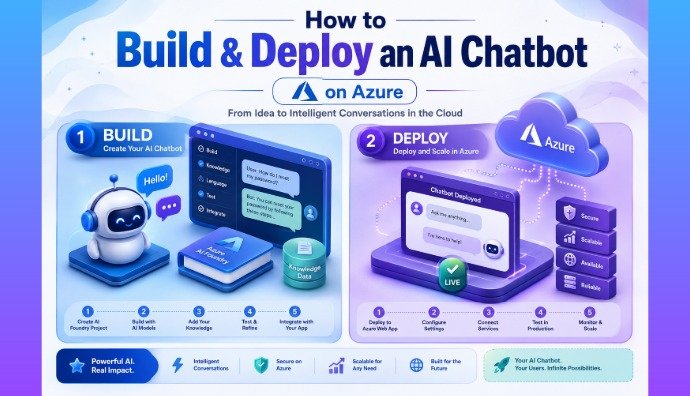
In this guide, we are tearing down that wall. You will get a practical, step-by-step blueprint to build, deploy, and scale an enterprise-grade AI chatbot using Azure OpenAI and Azure App Service. Drawing from real-world deployments and modern architecture best practices—like passwordless authentication—we will cut through the noise and show you exactly what works. Let’s turn that blank screen into a live, intelligent bot.
Why Build on Azure? The Enterprise Edge
If you have already built a basic bot using the standard OpenAI API, you might wonder why you should migrate to Microsoft Azure. The answer comes down to three things: security, compliance, and enterprise scalability.
Tech professionals and job recruiters alike look for developers who understand how to build systems that protect user data. Azure provides private networking (VNet integration), regional compliance, and role-based access control.
AI Insight: The biggest selling point of Azure OpenAI? Your prompts and company data are never used to train public OpenAI models. This data privacy guarantee is mandatory for most enterprise clients, making this an essential skill for your resume.
Phase 1: Architecture & Prerequisites
Before writing any code, we need to outline our toolkit. Building an Azure AI chatbot requires a blend of AI logic and web hosting.
The Tech Stack Breakdown
To deploy a chatbot on Azure OpenAI successfully, you will need:
Language: Python (the industry standard for AI and data science). If you need a refresher, check out our guide to Learn Python for AI and Automation.
Web Framework: Flask or FastAPI for handling backend requests.
AI Service: Azure OpenAI for accessing GPT models.
Hosting: Azure App Service for running your web app continuously.
Pro Tip: Keep your projects clean! Use GitHub Codespaces or create a local Python virtual environment (
.venv) to keep your dependencies isolated. This prevents frustrating version conflicts when you push your bot to the cloud.
Phase 2: Provisioning Azure OpenAI Resources
You cannot access Azure OpenAI models without first setting up a resource in the cloud.
Navigating the Azure AI Foundry
The Azure AI Foundry (formerly Azure AI Studio) is your command center. From here, you can deploy models, manage content filters, and monitor your token usage. While you can click through the Azure Portal to set this up, real tech pros use the command line.
Quick Try-It Guide: Want to spin up resources instantly? Use these Azure CLI commands to create a resource group and an AI resource, bypassing the manual portal clicks:
az group create --name MyChatbotGroup --location eastus
az cognitiveservices account create --name MyAzureAI --resource-group MyChatbotGroup --kind OpenAI --sku s0 --location eastus
For development and testing, I highly recommend deploying the gpt-4o-mini model. It is fast, highly capable, and budget-friendly for your Data Science Project Ideas.
Phase 3: Building the Chatbot Application
Now it is time to write the brain of your bot.
Connecting the OpenAI API in Python
When you build an AI chatbot on Azure, you use the standard openai Python library, but you configure it to point to your specific Azure endpoint rather than the public OpenAI servers.
Real Example: Instead of a generic assistant, give your bot a specific persona using a System Prompt. Let’s make ours a “Data Science Interview Coach.”
Your folder structure should look like this:
app.py(Your Flask and OpenAI logic)
requirements.txt(List of Python packages)
.env(Your local environment variables)System Prompt Example: “You are an expert Data Science Interview Coach. Ask the user technical ML questions, evaluate their answers, and provide constructive feedback.”
By structuring your app this way, your bot becomes a targeted, valuable tool rather than a generic text generator.
Phase 4: Securing Your Application (The Right Way)
Security is where beginners get separated from experts. Leaking an API key on GitHub is a nightmare you want to avoid.
Managed Identities vs. Hardcoded Keys
When testing on your local machine, it is fine to store your Azure API keys in a .env file. However, when deploying to the cloud, you must adopt a passwordless architecture.
Pro Tip: Never commit your
.envfiles to GitHub! Add.envto your.gitignorefile immediately.
For production, Azure offers Managed Identities. By using the DefaultAzureCredential class from the azure-identity Python library, your App Service can securely authenticate to your Azure OpenAI resource without ever needing a hardcoded key. It provisions a temporary, secure token behind the scenes.
Phase 5: Deploying to Azure App Service
Your bot works perfectly on localhost. Now, let’s share it with the world.
Taking Your Bot Live from Localhost
Azure App Service is a fully managed HTTP-based service for hosting web applications. It natively supports Python, meaning you do not have to worry about managing the underlying Linux servers.
You can deploy your code directly from the terminal using the az webapp up command, which automatically creates the App Service Plan and deploys your folder.
AI Insight: For a truly professional setup, configure continuous deployment (CI/CD) with GitHub Actions. By linking your GitHub repository to Azure App Service, your live chatbot will automatically update and restart every time you push new code to your
mainbranch.
FAQs ~
What is an example of Agentic AI?
An autonomous coding assistant is a great example. Instead of just suggesting code (like GitHub Copilot), an agentic tool will write the code, run it, find bugs, fix them, and deploy the working software entirely on its own.
Will autonomous agents replace software engineers?
No, but they will evolve the role. Engineers will shift from manually writing scripts to orchestrating and managing teams of specialized AI agents.
How is Agentic AI different from ChatGPT?
ChatGPT is reactive; it waits for your prompt. Agentic AI is proactive; it takes a broad goal, makes a plan, uses tools (like web browsers), and executes steps until the goal is completed.
Are AI agents safe to use for business?
Yes, provided they are built with safeguards. Most businesses use Human-in-the-Loop (HITL) systems, meaning the agent cannot finalize important actions (like moving money or deleting data) without human approval.
Conclusion
Conclusion
Building an AI chatbot doesn’t have to be an intimidating tangle of cloud infrastructure. By breaking the process down into manageable phases—provisioning resources via the Azure AI Foundry, writing your logic cleanly in Python, and deploying securely with Azure App Service—you elevate a simple script into an enterprise-ready application.
Whether you are a student building a standout portfolio project or a tech professional automating business workflows, Azure provides the scalable, secure foundation you need to succeed.
💡 Want to explore more AI tools and automation tutorials? Visit AnalyticsWithNabaN for hands-on learning and resources.
Explore more AI tools, data science tutorials, and automation guides at AnalyticsWithNabaN Stay ahead in the tech-driven world!